# Analysis and Discussion
## Performance Benchmarking Results
### Benchmark Overview
This benchmark evaluates the performance of image processing tasks
through three key metrics: Image Conversion, Pixel Iteration, and their
associated times. These metrics provide insight into both the initial
setup time and the efficiency of processing during steady-state
operations.
#### Benchmark Metrics
##### Pixel Iteration:
- **Warm-Up Time:** Time taken for the initial pixel operation during
the first setup.
- **Average Time:** Average time measured across 100 iterations,
excluding warm-up; indicates processing efficiency.
- **Total Time:** Cumulative time for all 100 iterations.
##### Image Conversion:
Time taken to load the image into memory and iterate through every pixel
in the image, applying a simple operation (converting to grayscale) and
then save the image.
#### Benchmarking Resources
**Image used for this benchmarking:**
 [Image
Link](https://dsext001-eu1-215dsi0708-3dswym.3dexperience.3ds.com/api/media/streammedia/id/E_f8pedmRKKh2YOrjjqJoQ/type/picture/key/l1/update/f79c98dbee35f056b55aeabe4f2b6845)
**Benchmarking Implementation repository:**
[Benchmarking Repository](https://gd-git.dsone.3ds.com/SFI19/sc-176)
### Benchmark Results:
[Image
Link](https://dsext001-eu1-215dsi0708-3dswym.3dexperience.3ds.com/api/media/streammedia/id/E_f8pedmRKKh2YOrjjqJoQ/type/picture/key/l1/update/f79c98dbee35f056b55aeabe4f2b6845)
**Benchmarking Implementation repository:**
[Benchmarking Repository](https://gd-git.dsone.3ds.com/SFI19/sc-176)
### Benchmark Results:
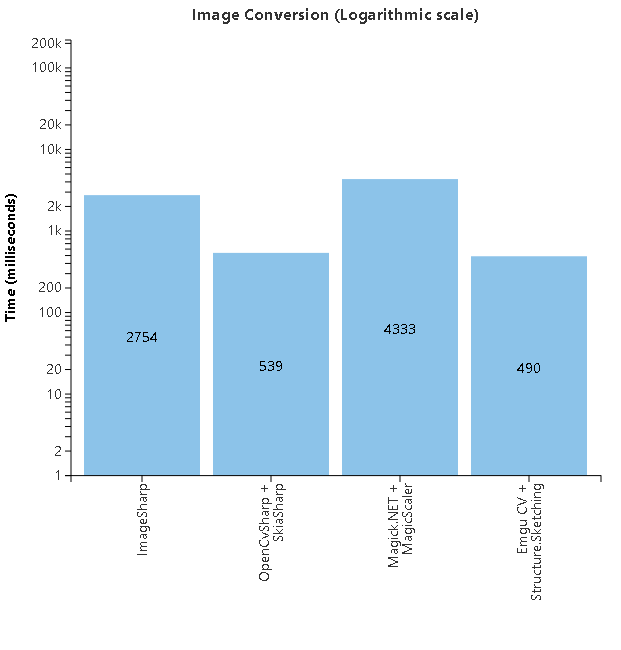 | **Library** | **Benchmark** | **Time (ms)** |
|:----------------------------------|:-----------------|:--------------|
| **Library** | **Benchmark** | **Time (ms)** |
| **ImageSharp** | Image Conversion | |
| **OpenCvSharp + SkiaSharp** | Image Conversion | |
| **Magick.NET + MagicScaler** | Image Conversion | |
| **Emgu CV + Structure.Sketching** | Image Conversion | |
| **Library** | **Benchmark** | **Time (ms)** |
|:----------------------------------|:-----------------|:--------------|
| **Library** | **Benchmark** | **Time (ms)** |
| **ImageSharp** | Image Conversion | |
| **OpenCvSharp + SkiaSharp** | Image Conversion | |
| **Magick.NET + MagicScaler** | Image Conversion | |
| **Emgu CV + Structure.Sketching** | Image Conversion | |
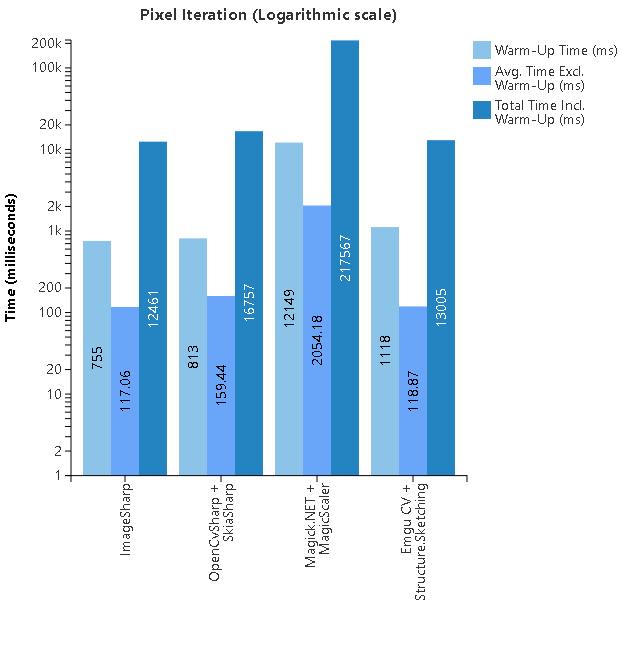 | **Library** | **Benchmark** | **Warm-Up Time (ms)** | **Avg. Time Excl. Warm-Up (ms)** | **Total Time Incl. Warm-Up (ms)** |
|:----------------------------------|:----------------|:----------------------|:---------------------------------|:----------------------------------|
| **Library** | **Benchmark** | **Warm-Up Time (ms)** | **Avg. Time Excl. Warm-Up (ms)** | **Total Time Incl. Warm-Up (ms)** |
| **ImageSharp** | Pixel Iteration | | | |
| **OpenCvSharp + SkiaSharp** | Pixel Iteration | | | |
| **Magick.NET + MagicScaler** | Pixel Iteration | | | |
| **Emgu CV + Structure.Sketching** | Pixel Iteration | | | |
## Memory Benchmarking
### Benchmarking Overview:
In this benchmark, we utilized BenchmarkDotNet to measure the
performance of various image processing libraries. BenchmarkDotNet is a
powerful .NET library that provides accurate and detailed performance
metrics. It handles the complexities of benchmarking, such as warm-up,
iteration, and statistical analysis, ensuring reliable results.
The benchmarking process involved the following steps:
- **Setup:** Initialize the environment and load the image.
- **Warm-Up:** Perform initial iterations to stabilize the
environment.
- **Measurement:** Execute the image processing tasks (Image
Conversion and Pixel Iteration) and record the time and memory
usage.
- **Analysis:** Analyze the collected data to determine the average,
total, and warm-up times, as well as memory allocations and garbage
collections.
The attached images and tables provide a detailed comparison of the
performance metrics for different libraries, highlighting their
strengths and weaknesses in various tasks.
### Benchmark Results:
| **Library** | **Benchmark** | **Warm-Up Time (ms)** | **Avg. Time Excl. Warm-Up (ms)** | **Total Time Incl. Warm-Up (ms)** |
|:----------------------------------|:----------------|:----------------------|:---------------------------------|:----------------------------------|
| **Library** | **Benchmark** | **Warm-Up Time (ms)** | **Avg. Time Excl. Warm-Up (ms)** | **Total Time Incl. Warm-Up (ms)** |
| **ImageSharp** | Pixel Iteration | | | |
| **OpenCvSharp + SkiaSharp** | Pixel Iteration | | | |
| **Magick.NET + MagicScaler** | Pixel Iteration | | | |
| **Emgu CV + Structure.Sketching** | Pixel Iteration | | | |
## Memory Benchmarking
### Benchmarking Overview:
In this benchmark, we utilized BenchmarkDotNet to measure the
performance of various image processing libraries. BenchmarkDotNet is a
powerful .NET library that provides accurate and detailed performance
metrics. It handles the complexities of benchmarking, such as warm-up,
iteration, and statistical analysis, ensuring reliable results.
The benchmarking process involved the following steps:
- **Setup:** Initialize the environment and load the image.
- **Warm-Up:** Perform initial iterations to stabilize the
environment.
- **Measurement:** Execute the image processing tasks (Image
Conversion and Pixel Iteration) and record the time and memory
usage.
- **Analysis:** Analyze the collected data to determine the average,
total, and warm-up times, as well as memory allocations and garbage
collections.
The attached images and tables provide a detailed comparison of the
performance metrics for different libraries, highlighting their
strengths and weaknesses in various tasks.
### Benchmark Results:
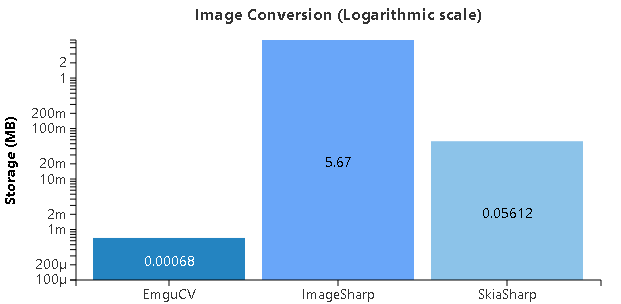 | **Library** | **Task** | **Mean Time** | **Allocated Memory** | **Gen0/Gen1/Gen2 Collections** |
|:---------------|:-----------------|:--------------|:---------------------|:-------------------------------|
| **Library** | **Task** | **Mean Time** | **Allocated Memory** | **Gen0/Gen1/Gen2 Collections** |
| **EmguCV** | Image Conversion | ms | MB (712 bytes) | \- / - / - |
| **ImageSharp** | Image Conversion | ms | MB (5,805.41 KB) | ,000 / 1,000 / 1,000 |
| **SkiaSharp** | Image Conversion | ms | MB (58,864 bytes) | \- / - / - |
| **Library** | **Task** | **Mean Time** | **Allocated Memory** | **Gen0/Gen1/Gen2 Collections** |
|:---------------|:-----------------|:--------------|:---------------------|:-------------------------------|
| **Library** | **Task** | **Mean Time** | **Allocated Memory** | **Gen0/Gen1/Gen2 Collections** |
| **EmguCV** | Image Conversion | ms | MB (712 bytes) | \- / - / - |
| **ImageSharp** | Image Conversion | ms | MB (5,805.41 KB) | ,000 / 1,000 / 1,000 |
| **SkiaSharp** | Image Conversion | ms | MB (58,864 bytes) | \- / - / - |
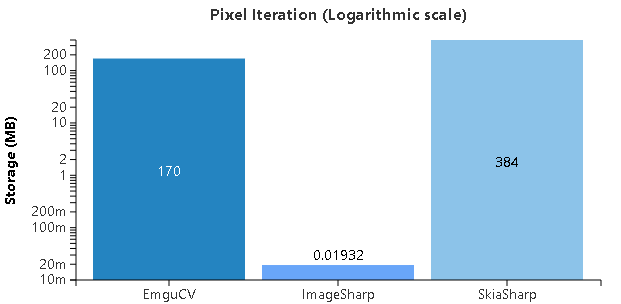 | **Library** | **Task** | **Mean Time** | **Allocated Memory** | **Gen0/Gen1/Gen2 Collections** |
|:---------------|:----------------|:--------------|:-----------------------|:-------------------------------|
| **Library** | **Task** | **Mean Time** | **Allocated Memory** | **Gen0/Gen1/Gen2 Collections** |
| **EmguCV** | Pixel Iteration | ms | MB (177,976,185 bytes) | ,142 / 1,571 / 1,571 |
| **ImageSharp** | Pixel Iteration | ms | MB (20.26 KB) | \- / - / - |
| **SkiaSharp** | Pixel Iteration | s | MB (403,300,552 bytes) | / - / - |
## Development Effort Estimation
### Overview
In this section, we outline the development effort estimation for
implementing image processing functionalities within our project. We
evaluate two primary approaches: custom development of an image
processing library and the integration of existing external libraries
such as OpenCV or ImageMagick.
### Custom Development of Image Processing Library
During our team discussions, we evaluated the possibility of developing
our own image processing library. While this would give us complete
control over the feature set, we found that it would require a
significant amount of effort **+100 story points**. For example:
- Implementing basic functionality like converting **BMP to JPEG**
alone would require approximately **40 story points**.
- Expanding to cover the full range of necessary image processing
features would take an impractically long time for the scope of the
project.
Given these factors, developing an internal library from scratch was
deemed too resource-intensive, and we opted for an external solution.
We referenced the following resources for additional insights into the
complexity of image conversions:
- [YouTube Video 1](https://www.youtube.com/watch?v=Kv1Hiv3ox8I)
- [YouTube Video 2](https://www.youtube.com/watch?v=0me3guauqOU)
### Use alternative Image Processing Library
Based on our discussions, the implementation effort for integrating
either OpenCV or ImageMagick into our Imagegen and ImageProcessor NuGet
packages can only be estimated roughly at this stage. However, we
anticipate that the development effort will be approximately **20 or
more story points** for either solution. This estimation takes into
account the necessary feature scope and the complexity involved in
replacing our current image processing functionality.
## Overall Comparison and Key Insights
### Overall Comparison:
The benchmarking results highlight the strengths and weaknesses of each
library in different tasks. SkiaSharp excels in image conversion tasks
due to its fast processing time and low memory usage. EmguCV, while
consuming more memory, provides the best performance for pixel iteration
tasks, making it suitable for complex image processing operations.
ImageSharp, although efficient in memory usage for pixel iteration,
falls short in image conversion performance.
The decision to adopt SkiaSharp for image conversion and EmguCV for
complex image processing is based on a balance between performance and
cost. SkiaSharp’s superior performance in image conversion and EmguCV’s
comparable performance to ImageSharp, combined with cost savings, make
them the preferred choices for their respective tasks.
### Key Insights:
- **SkiaSharp** showed excellent performance for **image conversion**,
with both the fastest time (63.97 ms) and the least memory
allocation (\~58 KB). This makes it an ideal choice for **image
conversion tasks**.
- **EmguCV** performed best for **pixel iteration** with a fast mean
time of **85.49 ms**, though its memory consumption was higher
(\~170 MB). The extensive **garbage collections** in EmguCV indicate
high memory usage, but the performance benefits outweigh the memory
cost for more complex operations.
- **ImageSharp** consumed minimal memory for **pixel iteration** (\~20
KB), but its **image conversion** performance lagged behind, taking
significantly more time than SkiaSharp and consuming more memory
(\~5.67 MB).
### Meeting Outcome and Final Decision:
- **SkiaSharp** will be adopted for **image conversion** tasks due to
its superior performance.
- **EmguCV** will be the preferred choice for **complex image
processing**. Although its memory consumption is higher than
**ImageSharp**, the performance between the two is similar. However,
the increased memory usage of **EmguCV** is within a manageable
range for our needs. The primary reason for choosing **EmguCV** is
the significant cost savings, as **ImageSharp** is considerably more
expensive, and switching to **EmguCV** allows us to reduce licensing
costs while maintaining comparable performance.
| **Library** | **Task** | **Mean Time** | **Allocated Memory** | **Gen0/Gen1/Gen2 Collections** |
|:---------------|:----------------|:--------------|:-----------------------|:-------------------------------|
| **Library** | **Task** | **Mean Time** | **Allocated Memory** | **Gen0/Gen1/Gen2 Collections** |
| **EmguCV** | Pixel Iteration | ms | MB (177,976,185 bytes) | ,142 / 1,571 / 1,571 |
| **ImageSharp** | Pixel Iteration | ms | MB (20.26 KB) | \- / - / - |
| **SkiaSharp** | Pixel Iteration | s | MB (403,300,552 bytes) | / - / - |
## Development Effort Estimation
### Overview
In this section, we outline the development effort estimation for
implementing image processing functionalities within our project. We
evaluate two primary approaches: custom development of an image
processing library and the integration of existing external libraries
such as OpenCV or ImageMagick.
### Custom Development of Image Processing Library
During our team discussions, we evaluated the possibility of developing
our own image processing library. While this would give us complete
control over the feature set, we found that it would require a
significant amount of effort **+100 story points**. For example:
- Implementing basic functionality like converting **BMP to JPEG**
alone would require approximately **40 story points**.
- Expanding to cover the full range of necessary image processing
features would take an impractically long time for the scope of the
project.
Given these factors, developing an internal library from scratch was
deemed too resource-intensive, and we opted for an external solution.
We referenced the following resources for additional insights into the
complexity of image conversions:
- [YouTube Video 1](https://www.youtube.com/watch?v=Kv1Hiv3ox8I)
- [YouTube Video 2](https://www.youtube.com/watch?v=0me3guauqOU)
### Use alternative Image Processing Library
Based on our discussions, the implementation effort for integrating
either OpenCV or ImageMagick into our Imagegen and ImageProcessor NuGet
packages can only be estimated roughly at this stage. However, we
anticipate that the development effort will be approximately **20 or
more story points** for either solution. This estimation takes into
account the necessary feature scope and the complexity involved in
replacing our current image processing functionality.
## Overall Comparison and Key Insights
### Overall Comparison:
The benchmarking results highlight the strengths and weaknesses of each
library in different tasks. SkiaSharp excels in image conversion tasks
due to its fast processing time and low memory usage. EmguCV, while
consuming more memory, provides the best performance for pixel iteration
tasks, making it suitable for complex image processing operations.
ImageSharp, although efficient in memory usage for pixel iteration,
falls short in image conversion performance.
The decision to adopt SkiaSharp for image conversion and EmguCV for
complex image processing is based on a balance between performance and
cost. SkiaSharp’s superior performance in image conversion and EmguCV’s
comparable performance to ImageSharp, combined with cost savings, make
them the preferred choices for their respective tasks.
### Key Insights:
- **SkiaSharp** showed excellent performance for **image conversion**,
with both the fastest time (63.97 ms) and the least memory
allocation (\~58 KB). This makes it an ideal choice for **image
conversion tasks**.
- **EmguCV** performed best for **pixel iteration** with a fast mean
time of **85.49 ms**, though its memory consumption was higher
(\~170 MB). The extensive **garbage collections** in EmguCV indicate
high memory usage, but the performance benefits outweigh the memory
cost for more complex operations.
- **ImageSharp** consumed minimal memory for **pixel iteration** (\~20
KB), but its **image conversion** performance lagged behind, taking
significantly more time than SkiaSharp and consuming more memory
(\~5.67 MB).
### Meeting Outcome and Final Decision:
- **SkiaSharp** will be adopted for **image conversion** tasks due to
its superior performance.
- **EmguCV** will be the preferred choice for **complex image
processing**. Although its memory consumption is higher than
**ImageSharp**, the performance between the two is similar. However,
the increased memory usage of **EmguCV** is within a manageable
range for our needs. The primary reason for choosing **EmguCV** is
the significant cost savings, as **ImageSharp** is considerably more
expensive, and switching to **EmguCV** allows us to reduce licensing
costs while maintaining comparable performance.